Friday, June 24, 2011

Improving Ad performance: Correlating ad activity with feature usage and user behavior

In this third installment on application analytics patterns and practices I’m going to focus on how Runtime Intelligence can be used to shed light on Ad activity within the context of one or more applications. While the use cases covered here are nowhere near exhaustive, I’m going to show how to answer the following questions (and hopefully give some indication as to why you may care about the answers):

  • What are ad impression volumes across multiple apps?
  • What are the click-through rates (the ratio of users clicking on ads to the volume of impressions) across various pivots?
  • What influence does culture (country of origin) have on click-through rates, e.g. are Germans more or less likely to click on ads versus Italians?
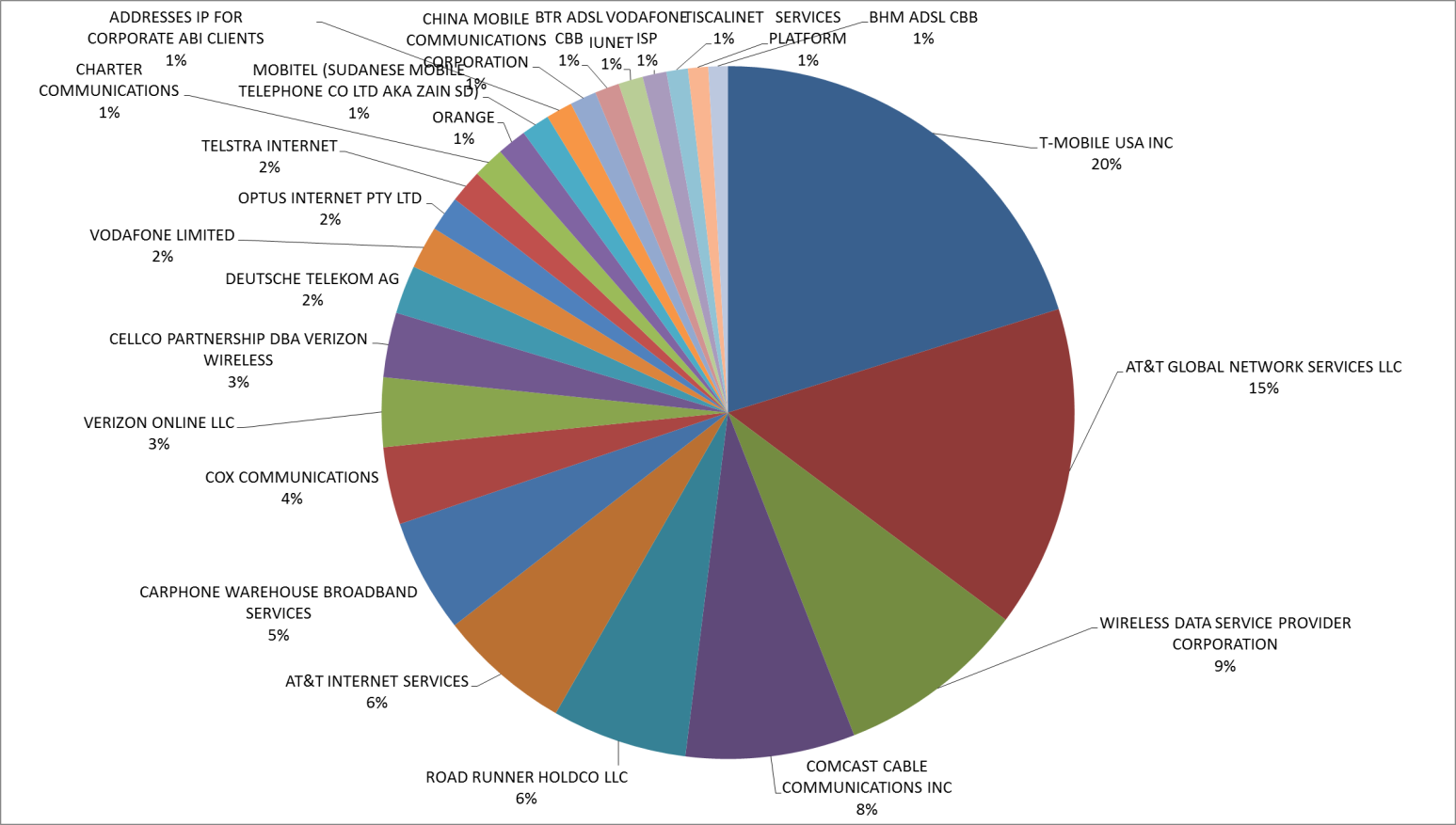
  • What carriers/ISP providers are giving me the most business, e.g. where are my users most likely to be found?
  • Where are users spending most of their time inside an app? Does that usage pattern correlate with a user’s likelihood of clicking on an ad?
  • Do returning users interact with ads differently than first time users or power users?
Many of these metrics are valuable in scenarios other than ad effectiveness of course (knowing where users spend their time and understanding how power users behave are two obvious examples), but for this installment, I am going to focus exclusively on how Ad interaction can be viewed across these metrics.

Implementation
I'm using the same trusty one line method WhatPoseWhen that I described in the first installment – this time, I call the method on the New Ad event (to count impressions) and the Ad Engaged event (to count clicks on ads). I could just as easily collect data on any other ad-related event and grab any data that is available to the program at that point in its execution as well. Here is the code for that method in its entirety:


private void WhatPoseWhen (string page, string selection)
{ return; }

The first parameter tells me from which page the method is being called and the second parameter tells me why I might care, e.g. was a new ad displayed, etc.)

I pass the page name and the ad event into WhatPoseWhen and Runtime Intelligence grabs these parameters and sends them up to the repository (no programming for this). I can then correlate the ad activity within the context of sessions, feature usage, and runtime stack data that I am getting as a part of runtime intelligence.

For these metrics, I export my CSV data into a regular excel spreadsheet and then generate the pivot tables shown below.

App background
I always like to use data from true production apps rather than fabricate data sets; I am using two apps that I wrote and launched on the marketplace that are both ad driven, Yoga-pedia and A Free WPC Yogi – the former is a free version of a yoga app that (hopefully) helps to drive sales of a for an upgrade to A Pose for That. A Free WPC Yogi plays a similar role for The WPC Yogi, a tailored version of A Pose for That targeting WPC 2011 attendees.


The following post uses their Ad activity over the same one week period.

Impression counts
The following pie chart shows the “new ad” event count by application. As you can see, Yoga-pedia has roughly 4X the number of ad impressions and given the fact that these apps are very similar (but not identical) in their behavior, this also roughly correlates to the volume of usage as well.


Click-through rates
However, when I divide the total number of “ad engaged” events by the total number of “new ads,” I see that A Free WPC Yogi has a 28% higher click-through rate (1.78% versus 1.37). In point of fact the demographics of the app users are quite different (randomized consumers versus MSFT partners who are attending WPC 2011).


Advantage: This intelligence helps to segment users by differences in their behavior and to do a better job of targeting those differences across apps.


Impressions by country (or culture)
Runtime Intelligence can grab the IP address of the sending tower – this is not personally identifiable and cannot be used to locate an individual with any precision – but it is more than adequate to identify country, state, and city. In the following graph, I simply count new ad events by country and show the top 10 countries by impression volume.


Advantage: If your app has a cultural bias that would benefit from localization, understanding where your users are can help prioritize those localization efforts.


Click-through rates by country (or culture)
The following bar chart calculates the click-through rates for the top 10 countries listed above. What is interesting here is that there appears to be a significant difference in click through rates by country (culture).


Advantage: Understanding when/if users from specific cultures are significantly more likely to respond to (click on) ads can further help to prioritize localization or marketing investments.


Impressions by ISP provider (top 25)
To produce the next graph, I used an application to tell me who owned the IP addresses that my mobile clients are using (I used IP2Location – but there are many of them out there).

This is a nice way to see who my users favor in terms of their carrier. Here I only show the top 25.

Advantage: Understanding carrier popularity will help focus business development/marketing efforts and better manage potential risks associated with how your users may be negatively impacted by upgrade schedules (delays). Will your next app be dependent upon Mango?


Sessions per app page
In the raw CSV files that can be exported from the Runtime Intelligence portal, there is a column, ApplicationGroupId. The value in this column is unique for all signals (messages) that are sent from within a single app session. In other words, I can use this field to organize all user activity into the relative user sessions using this field. This is helpful for plotting specific user patterns.

The following graph simply counts the unique occurrences of ApplicationGroupId values by page name value (recall that this is the first parameter of the WhatPoseWhen method). This avoids counting multiple views of a single page within a single session and tells me how popular specific pages are across my user base. For this posting and for illustration, I’m only showing data for five specific pages.


FindAPoseDetail and BrowseSelectPose are central to the user experience (browsing for yoga poses and then drilling into a specific pose for detailed imagery and instruction). TellMeMore is the page where I describe what comes with the paid version of the app (nice to see that 10% of my users deliberately choose to investigate the upgrade possibility) and AppGuide and TopicList are essentially app documentation and I can see that these pages are not hit very often – and that’s not a bad thing – users should not need to use the documentation after their first use.

So – this graph is telling me that

a) My users are spending their time using the app rather than trying to use the app
b) I am at least getting my user’s attention regarding a possible upgrade – perhaps my content is not compelling enough if my conversion rate does not correlate.

Advantage: broad user proofing can be used to validate developer assumptions about user experience and effectiveness of pages for their specific purpose.
Ads shown per page compared to volume of times viewed
Next I calculate the average number of ads shows per page by dividing the total count of New Ad messages by page (this combines the two parameters, page name and the even New Ad) by the total count of the times the page is shown. TOTAL ADS SHOWN PER PAGE / TOTAL TIMES PAGE VISITED

I use the same ad duration interval across all of my pages – so this is actually another means of calculating how much time my users are spending on each page (this can be done with Runtime Intelligence alone, but in this case, I don’t have to do that).

The graph below shows the average number of ads shown per page and maps them to where they rank in terms of how often the page is visited.


Happily, the two core pages of my app also get the most ads (and are also where my users are stopping to spend time). I can also see that users spend more time on detailed pose descriptions than they do browsing – even though the browse more often than they drill down (which makes perfect sense).

Sadly, my upsell page is getting the least love – I definitely have to work on making this page more engaging.


Advantage: Ad frequency by page provides insight into where users spend their time. Calculating click-through rates by page identifies where users stop to look around and may be most open to suggestion.

Returning users and sessions per user
Another column in the CSV extract is the ANID – this is either the result of hashing the true ANID from a user’s phone (it is not the actual ANID value), or, if they opt-out of that, it will contain a GUID generated by our software and written to isolated storage. In either case, this value acts as a unique user identifier.

The ANID can be used to identify new and returning users. Dividing session count (ApplicationGroupId) by ANID gives the average number of sessions per user. The following bar chart takes the 10 ANIDs with the highest session counts and compares the resulting sessions per user value to the rest of the user base (whose count is roughly 500 other users).


What I see is that there is a core group of users that are heavily using my apps (YAY!). Now that I know who they are, I can zero in on their specific behaviors, how they relate to my ads, what features they use most heavily, etc.


Advantage: Segmenting users into new, returning, and power categories dramatically improves a developer’s ability to target, prioritize, and validate development, marketing, and support activities.

Conclusion

I hope to have shown how using Runtime Intelligence, developers can materially improve their ability to build more effective applications and refine their advertising strategy while coordinating that strategy with complimentary upsell strategies as well.


Advantage: Development!

Tuesday, June 14, 2011

Increasing App sales with Analytics: Free apps versus trials

In my previous entry I introduced my app, A Pose for That, explained how I had instrumented my app with Runtime Intelligence to better track user experience and behavior. As a case in point, I illustrated how strategically placing upgrade opportunities in various locations inside my trial version, I was able to increase my conversion rates – perhaps by as much as 50%!

HOWEVER, when I was at MIX11, a very experienced developer (let’s call him David because that’s actually his name) told me that he had already established the optimal app blend to maximize revenue – it was to have a free app (not a trial version) that also offered ways to upgrade to the premium app. He pointed out that trial apps do not show up as free in the marketplace and are therefore almost always overlooked by most casual marketplace browsers. A free app gets the eyeballs that a trial misses.

For those who know me, they know one of my core principles is that my ideas never have to be original, they only have to be good – so is David’s idea really a good one?

To test it out, I created Yoga-pedia, a free app that included the browsing capabilities of A Pose for That with good imagery and instruction, but did not include the pairing of poses to real-world situations (a feature I believe is valuable) or flows (the stringing together of multiple poses). On the welcome page (and one or two other places) I give users a chance to learn more about our software and upgrade; Here is the welcome page and the “tell me more about why I should upgrade page.”


I instrumented the various points where users can upgrade in both the trial and the free app so that I can compare BOTH the usage levels of the two apps AND the upgrade requests that stem from that usage. So… let’s go to the video tape – or better yet, Runtime Intelligence. (Note – these specific graphs are built by extracting the data from the runtime intelligence repository into a spreadsheet and then generating a simply pivot table).

By looking at application starts (not downloads in the marketplace sense of the word), the graph showing App Runs seems to support David’s logic; my free version, Yoga-Pedia, takes off like a rocket and within 24 hours eclipses trial activity in dramatic fashion. …but, it also seems to be cannibalizing trial activity too – Should I care? (NOTE – I am combining usage of multiple applications – not always easy to do with canned dashboards)


I probably should care IF users are more likely to upgrade from A Pose for That trials versus from Yoga-pedia. In other words, are my sales going up because of the free app even though it is depressing my trial volume? Let’s go to Runtime Intelligence one more time…


What the graph above shows is that upgrades from my trials also decreased dramatically with the launch of Yoga-pedia, BUT the volume of upgrade requests from within Yoga-pedia more than made up for that shortfall. (NOTE – I am combining feature usage across multiple applications – not always easy to do with canned dashboards)

In the one week where both the free and the trial versions lived side-by-side, the free version generated 86% of the upgrades.


More important is the bottom line: I saw an 85% increase in the total number of upgrades when I had the combination of both a free and trial version of my app available.

Coming up next (I promise this time) will be a discussion of the last leg of David’s magic formula for success – making your free version ad-driven. What will Runtime Intelligence be able to tell us about that?

Wednesday, June 8, 2011

Implementing Customer Feedback Forms AND fine tuning try/buy strategies with Runtime Intelligence

My Adventures in WP7 App Development: a beginner’s tale

I deployed my first WP7 app to the marketplace on May 13th. Prior to that, I had not written a line of code in nearly 20 years and so I think I can safely call myself a beginner. The fact that I might actually have something to share with the broader (and almost universally more experienced) development community shows how effective development tools have become and how wide-open the smartphone market is at this point in history.

My app (A Pose for That and the free alternative Yoga-pedia) pairs user situations and ailments with yoga poses – the app essentially uses the smartphone as an intelligent, just-in-time publishing platform.

USER SURVEY DATA TRANSPORT, MANAGEMENT, AND REPORTING

One of the capabilities I wanted to include in the app was a simple user survey form – I wanted to know how often users practiced yoga on their own and whether they hoped that this app would increase or improve their yoga practice – but I didn’t want to ask users to write an email (too much effort for them) and I did not want to incur the extra programming, setup, and expense of implementing my own content management store (too much effort for me).

Here’s what I did, for free, and with (virtually) no programming whatsoever…

I used Expression Blend to build my form (no programming), Dotfuscator for Windows Phone to inject the data collection transport logic (no programming), and the Runtime Intelligence Service for Windows Phone to store, manage, and publish user responses (again, no programming). I had to write one method (one that I actually reuse in a variety of ways including try/buy strategy tuning and ad monitoring that I will blog more on later).

That method (in its entirety) is:

private void WhatPoseWhen (string page, string selection)
{ return; }

…but I am getting ahead of myself. Here is a screen shot of the survey form:

It asks my two basic questions with two 3-way radio buttons to indicate true, false, or no comment. When the user leaves this page for any reason other than a tombstone event, I construct a single string that captures the user’s response. For example, if the user answered in the affirmative on both counts, the app assembles the string “I practice yoga 2X per week or more And I hope that this app will increase and/or improve my practice.” and puts it in a local variable UserFeedBack. If answer in the negative, I just assign the string “And.” Then, I call my custom method (above) like so:

WhatPoseWhen("feedback", UserFeedBack);

That’s it for my coding – I just build the app.

Now, I go to Dotfuscator for Windows Phone. It takes about 3 minutes to register for the service at www.preemptive.com/windowsphone7 (fill out the form at the bottom of the page) and another 5-10 minutes to point Dotfuscator to the XAP file in question, exclude third party assemblies (in my case, Telerik’s WP7 controls used elsewhere in my app), and tag the entry and exit points of my app inside the Dotfuscator UI.

The last step required to complete my user feedback form and service is to add one attribute for Dotfuscator, a feature attribute as follows:

I right-clicked on the method WhatPoseWhen (in the left pane) and selected Add Feature Attribute – all I needed to type into the form on the right-hand side of the screen was a name for the feature (WhatPoseWhen) and insert an * in the ExtendedKeyMethodArguments property. This tells Dotfuscator to grab any/all parameter values passed into this method whenever it is called and send it up to the Runtime Intelligence portal. In this case, I am identifying the context (feedback) and passing the string that I constructed based upon their responses inside the variable UserFeedBack.

This takes 2 minutes tops to configure and then I press the “build” button and out pops my new and enhanced XAP file. I submitted my app to the marketplace with no special handling required and then waiting for the numbers to roll in. This takes days between marketplace processing, user adoption, and Runtime Intelligence number crunching. Days is still much faster than the weekly marketplace statistics and obviously much more flexible but slower than the ad-server stats – it’s right in the middle.

The results can be seen (in part) in this screen capture – I can log into my Runtime Intelligence account and select custom data to see the following (note - alternatively, I can extract CSV files for further analysis)

The highlighted row “page” and “feedback” shows that 24 users went to the feedback page during the selected interval (I scratched out the actual interval because of the sales numbers that are reflected here too - it’s none of yur beeswax). In the last row shown here (also highlighted) you can see that of the 24 page views, 16 of these users indicated that they did NOT practice 2X per week and they did NOT expect this app to change that. (the more positive responses can be seen lower down on the page but are not shown here).

The bottom line is that I was able to implement a user survey mechanism including secure transmission, storage, and basic analysis with essentially no programming and no requirement to setup a hosted content management system - ALL IN LESS THAN AN HOUR.

FINE TUNING TRY/BUY STRATEGIES

I also call my trusty little method WhatPoseWhen throughout the app during trial periods. The screen capture above also shows basic try/buy behaviors. A Pose for That implements a Try/Buy mechanism. If a user is in Trial mode, they are presented with an opportunity to upgrade right on the main page of the app. That is the “UpgradeNow” option. Additionally, whenever a user selects functionality that is NOT included in the trial (say showing a large image of a pose with detailed instructions), they are presented with a screen letting them know that they have bumped up against the limits of the trial version and would they like to upgrade right then and there – more of an impulse upgrade.

What the screen capture above is telling me is the following:

1) Users were presented with the “impulse upgrade” option inside a trial 130 times during the selected time interval.

2) When presented with this choice, users chose to NOT upgrade and return to the previous page 111 times (or 85% of the time the said thanks but no thanks). However, it also shows that 19 times (15% of the time) they DID choose to upgrade on the spot.

3) During the same interval, 38 users selected the “Upgrade Now” button on the main page.

I have not chosen to do true A/B testing in this case, but one thing that I am almost certain about is that some of the 19 users who upgraded “inside” the app would NOT have gone back to the main page at a later time and upgraded via the standard menu choice.

My two-pronged upgrade pattern may have increased my conversion counts during this interval from 38 to 57 or an increase of 51%!

Using the CSV extracts, I can dive deeper to see what features are more likely to result in an upgrade and also get a sense of how much is too much, e.g. users that abandon the app and never come back. (Note, I am not EVER transmitting ANID or other PIID information).

COMING UP NEXT: USING RUNTIME INTELLIGENCE TO TRACK AND OPTIMIZE AD PLACEMENT STRATEGIES

Friday, May 13, 2011

It takes an ecosystem

This is my simple tale of how two people with an idea and no programming skills conceived, developed and launched a smartphone app in just a few weeks’ time. …And how it would never have happened without development tools AND PEOPLE committed to helping others express themselves through code. Here goes…

My wife is a spectacular yoga teacher – and, in support of that, I have from time to time worked with her to produce DVD’s – typically planned to ship around her birthday, May 8 (you can see a sample of our handiwork on Amazon at Introduction to Qi-Yoga).

We had a lot of fun working on these and, while sales were modest, they were global and the reviews were universally positive – given the fact that I knew nothing at all about video/sound editing/production before our first project – we were happy with our results.

None of this would have been possible without the help of Apple who, with their FinalCut tools, broke the back of high-end (expensive, complex) video editing workstation vendors (like Avid). Apple made it possible for non-professionals (like me) to produce professional video content.

…but DVD’s are so 2008 – smartphones are where it’s at now – right?

My wife agreed - the world needed a yoga App for that!

And given Apple’s dominance of the smartphone market, this should be a snap – right?

Sadly, that proved to be very very wrong.

It turns out that Apple does not love the development world in the same way that they loved the design world. Ironically, Apple is actually the “Avid” of smartphone development. In point of fact, it’s been Microsoft that’s been having a long term love affair with development all these years…

…Enter Windows Phone 7.

A little over a month ago, I approached my wife with the idea for developing a yoga app that does more than push content – we wanted one that actually paired poses with everyday situations and delivered just the right amount of information at just the right time. She loved the idea and we went to work – she developed the knowledgebase and I was tasked with writing the code – but the fly in the ointment was that I had not written a line of code in over 20 years (and trust me, comparing 80’s programming tools to today’s is like comparing a cassette tape player to a MP3 player) – I was now an absolute beginner.

The only advantage that I had was that I was aware of the software, training, and social resources that Microsoft and their partners were pushing. Here is how we did it… (to be clear – I have made NO attempt to build a comprehensive list of WP7 resources – there are lots of those out there – the following are the specific steps and resources that I used. )

1) Download the development tools from Microsoft and join the App Hub. Go to http://create.msdn.com/en-US/

2) Download analytics from PreEmptive Solutions. Go to http://www.preemptive.com/windowsphone7.html

3) I signed up for a promotion from Telerik to get their controls for free. Their components were awesome and the support was fantastic (meaning patient with me). Go to http://www.telerik.com/products/windows-phone/getting-started/user-groups.aspx

Then I had to get started…. Remember, I had no C# or .NET development skills – so I began with

4) Windows Phone 7 Development for Absolute Beginners. http://channel9.msdn.com/Series/Windows-Phone-7-Development-for-Absolute-Beginners

While I did not go back to these videos once I got rolling (video is just too slow to navigate around), these were essential to getting me started.

5) The following specific links include lots of sample code and all levels of instruction (from step-by-step to technical reference manual level) – the ability to be spoon-fed and then drill down when you need a specific piece of detail is what made it possible for me to avoid having to learn what professional developers have to learn.

* Building a Windows Phone 7 Application from Start to Finish http://msdn.microsoft.com/en-us/library/gg680270(v=PandP.11).aspx?ppud=4

* MSDN Blogs > Silverlight SDK http://blogs.msdn.com/b/silverlight_sdk/

* The APP HUB blogs, community and resources http://create.msdn.com/en-US/

* Binary WasteLand materials on CSHARP and WP7 http://binarywasteland.com/category/programming/languages/csharp/

Where am I now?

I built and tested my app and submitted it to the Marketplace on May 10. On May 12th, my app officially hit the Microsoft Marketplace (it hasn’t even been 24 hours yet).

If you have a Windows Phone - check out A Pose for That now.

Now comes the next question – when it came to our DVD’s, Apple did nothing to help us promote our video – they only made it possible to produce it. I will be writing more to cover what works (and what doesn’t) when it comes to marketing a WP7 app.

The ecosystem is more than a platform and more than “a village” – It’s both

Before I end my tale, I must shout out to the people who helped us along the way (I am not giving full names since I have not asked permission). Everyone here helped me on their own time just because they are passionate about the platform. They were David and Bill from PreEmptive, Valio from Telerik, David from Wirestone, Pierre from VinoMatch, and Gergely from Cocktail flow. Their shared tribal knowledge shortened this project and improved the result - of course, I take full responsibility for all mistakes and hacks.

Microsoft has long understood the value of a development ecosystem, but I don’t think even they would have predicted how transformational a development-centered approach could become with the emergence of the smartphone. I know that there are lots of factors going into the success or failure of Windows Phone 7, but the value of Microsoft’s focus on helping non-professional developers produce professional-grade code cannot be overstated.

My wife and I already have our product roadmap down – there’s a lot more to come - look out!

Monday, March 14, 2011

Privacy and Security: if it’s your app, then it’s your @$$

This is the first of a continuing series to help smartphone app developers make more informed design, development, and policy decisions. The objective is to raise material issues, options, and risks specific to mobile app development (but not to give legal advice).

Specific topics to come include;

  • PII: what definitions are out there and which ones can you not afford to ignore?
  • Opt-in Opt-out: what should your defaults be? How often must you ask? Do you need separate opt-ins per app? Per app version? For regular use AND exception reporting?
  • Data retention and reuse: do you own your own data? Do you need to care about partner data policies or only your own?
  • App hardening: what risks stem from app reverse engineering and/or tampering? How do you know if you should care?
This first entry will delve into the broader motivations behind this series and call out aspects of the mobile app development experience that set it apart from other platforms and markets.

It’s impossible to guarantee that an app will never do harm

Evolving technologies, emerging and divergent regulations, and evolving social and ethical mores have made it is simply impossible to define a concise, bullet-proof set of policies and development patterns that are guaranteed to do no harm to either user or developer. Effective risk management must, by necessity, be a practice governed, to a significant degree, by subjective guidelines.

When god wants to punish you, He answers your prayers

It’s no secret; the convergence of technical, social, economic, and market forces that we call “the smartphone” is a mega-opportunity for those who “get it right.” And what’s greasing the skids speeding this disruptive force of change? Apps of course. Apps are on the front-line hooking consumers and driving the smartphone revolution – pretty cool right? Most definitely.

Swimming in deep waters is always cool, but sometimes it can be deadly too.

The most powerful corporations, the smartest entrepreneurs, and the crème de la crème of investors are racing to meet exploding smartphone demand. And when that much money, information, and power are on the move, criminals (of all kinds), lawyers, regulators, law enforcement, and all genus of government will be right there with us.

These are deep waters indeed.

To serve an app: Is it a cookbook?
Do app developers need to care about this stuff? Consider that when a developer ships their first phone app, they will most likely have already entered into as many as five different (and almost certainly contradictory) binding legal agreements that include assignments of personal liability tied to the developer’s privacy policy and their app’s security. Each tool supplier, marketplace owner, platform provider, ad-server provider, and (last but not least) user demands this assurance.

As an app moves across platforms and international borders, the developer’s legal obligations multiply and, as such, so does their material risk.

To be clear, there is nothing inherently wrong or unreasonable here; but it IS unprecedented.


The list of potential concerns grows considerably when one stops to consider ethical considerations (what’s the right thing to do versus the legal thing) on one hand, and the technical/development security requirements on the other.

In order for a developer to ensure that both their users’ and their own interests are being addressed, application design and development priorities must account for operational and contractual requirements (in addition to market-driven feature functionality of course.)

What level of due diligence and development investment is appropriate?

The diversity of the interested parties and the number of governing agreements all covering essentially the same act (running a single app on a phone) make it especially important that the developer understand:
  • Definitions: For example, do all parties use the same definition for PII (personally identifiable information) and do they use it consistently (when defining the developer’s obligations versus their own)?
  • Obligations: For example, are you agreeing (and indemnifying the other party) to adhere to multi-national regulations – many of which you will have no knowledge of?
  • Rights and privileges: For example, what usage and commercial rights to application usage, user behavior, and other data are conveyed? Are these subject to change?
  • Notifications: Under what conditions, through what channels, and in what timeframes must which information be communicated? Does the developer have different special obligations?
Knowledge management versus risk management
Most people divide the world into things they know and things they don’t and then try to manage their risk within that “circle of knowledge.”


Knowledge management is not risk management and often misses a danger-zone where risk most often hides; in “the things we don’t know that we don’t know” and “the things we think we know, but we don’t.”


If you “don’t know you don’t know”, then you miss the chance to educate yourself or ask for expert advice.

Similarly, if you think you know something, but you’re wrong, you may find yourself exposed or missing an opportunity.

The single-minded objective of this series will be to shrink the “danger zone” for mobile app developers; to make sure that you don’t get bitten by security, regulatory, or social gotcha’s that you didn’t even know were out there.

The take away from today’s installment is a very simple one; if it’s your app that gets jammed up – rest assured; it’s going to be your @$$ on the line.

Wednesday, February 16, 2011

Survey sez!

We are deep into two WP7 dev surveys, but I just love this stuff and so I'm going to leak some preliminary data out now – if you want me to send you a link to the final results, send me an email at sebastian at preemptive dot com.

The first survey we are doing goes back to the earliest group of WP7 developers, “first 300,” and asks how they have made out over the past two months.

The second survey targets roughly another 1,500 active wp7 devs who are using analytics and/or obfuscation but who began their work after the initial survey.

Here are a few tidbits that we see so far…

Analytics improves mobile development practices and app value

Going back to the original 300 and asking those who had deployed apps with analytics, we have found that:

  • 82% of the devs say that using Runtime Intelligence (RI) has “helped them to establish for themselves the value of analytics for app development overall”

With regards to their specific WP7 app in the marketplace, the devs directly credited their use of RI as:

  • Increasing the value of their app (45%)
  • Improving their app’s user experience (36%)
  • Improving their app's quality (27%)

Mobile app devs migrating to WP7 4X’s faster than .NET devs

In the first 300, only 4% of the registered developers targeted two or more additional mobile platforms. This indicated to me at least that the very first developers to develop for WP7 were already MSFT devotees versus serious mobile app developers exploring WP7 as an alternative/incremental mobile platform.

However, in the latest wave of developers, that stat has more than quadrupled. There is no question that developers who identify themselves as mobile app developers first rather than iOS, .NET, or Android developers are building for WP7.

Platform share for those developers targeting multiple mobile platforms are (in addition to WP7):

  • iOS 69%
  • Android 67%
  • RIM 23%
  • Symbian 5%

There’s a lot more to come – so stay tuned (or shoot me an email). Cheers!

Tuesday, February 1, 2011

Riddle me this! Where can French, Italians, and Germans all agree?

Well, apparently, its in their tendency to pair wine with spicy Chinese food.

How did I come up with such a farfetched notion? The answer to “how” is “easily” when I started with a WP7 app like VinoMatch’s Mobile Sommelier that was instrumented with Runtime Intelligence for Windows Phone. But let me back-up a little.

On Nov 4, 2010 MSFT and LG announced that LG Owners Get Free Access to Popular Windows Phone 7 Applications. You can read more about the 10 premium apps and another 10 LG-specific apps on LG’s Facebook page here. They call the program “hAPPiness!”

Anyhow, it turns out that all 10 of the premium apps were instrumented with Runtime Intelligence and have been sending analytics since the January launch of the program.

Last week, Microsoft invited lead developers from all ten development teams on campus for three days to gather feedback as well as to hold some specialized training on a variety of technical topics – and I was fortunate enough to be invited to lead a discussion on best practices for incorporating mobile analytics into the development process. In support of this presentation, I was given permission to look into the runtime data that these 10 apps had been collecting to see what I could see.

The 10 premium apps that are free from LG through March 10th are:

1. Cocktail Flow by Gergely Orosz
2. Color Sprouts by Jarek Kowalski
3. Colorize by Kitron Software
4. Doodle God by JoyBits Ltd. (a Top 100 Paid App)
5. Envision by Dotnetfactory
6. Krashlander by Farseer Games (a Top 100 Paid App)
7. Mobile Sommelier by VinoMatch
8. Mr. Hat and the Magic Cube by BRAVO game studios
9. Talking Ragdoll by Spritehand LLC (a Top 100 Paid App)
10. Weave by Seles Games (a Top 100 Paid App)

While I can’t share the entire presentation here, VinoMatch and Gergely Orosz were kind enough to give me permission to include some of their mobile analytics in this discussion. I want to highlight two powerful analytical techniques using their real-world data.

Conversion feature analysis

Embedded within most apps are a few keystone features that drive conversion (from eval to paid, prospect to customer, fan to fanatic) and Cocktail Flow has one under development, Shopping Assistant. It does not yet connect directly to a store and, as a nascent feature, is not yet a centerpiece in their UX design. Here is what I was able to deduce from the Runtime Intelligence data:
  • Only 5.5% of all user sessions used the shopping assistant feature.
  • Of those, 49% used shopping assistant only once inside their session, and 51% used shopping assistant multiple times. Of those 51%, they used it for an average of 2.9 times per session. What were they doing?

With Runtime Intelligence, I am able to map out the full usage trail, feature-by-feature, session-by-session, and so I am also able to visualize:

  • Where in the sequence of features of each user session shopping assistance was being called.
  • And when it was used, was it a part of a “one use” session or one of those sessions where the user called the shopping assistant multiple times in a single session.

I can also see that the overwhelming number of Cocktail Flow users using this feature rarely used more than 10 features in their session and that virtually all lengthy sessions (taking more than 14 actions) were always churning (going back to the shopping assistant feature multiple times).

When this feature is functionally complete to the developer’s satisfaction, they will now have benchmarks to measure feature adoption (increase it over 5.5%) and session behaviors (when, how often, and under what circumstances the feature is used) all relating to what may ultimately be their most lucrative app feature.


Mutli-variable AB testing and cross-domain user profiling


In the Cocktail Flow example, we focused on a single feature. With Mobile Sommelier, we are going to add a few more dimensions.

The following graphic shows, as a relative percentage, how often ten selected features inside the Mobile Sommelier application were used over a 6 day period.

What we can see immediately is that there is very little variability over time. The population of users generally uses the application in the same way over time.

What can we do with this perspective?

If we were to release a new version of this App, we could immediately see any meta shift in behavior across the two versions (Runtime Intelligence will automatically roll-up multiple versions and then break them out when asked).

What CAN’T we do?

While we can see how often the “ShowTasteCard” feature has been used, we CAN’T readily determine which wine/food pairing users are most (or least) interested in. We can’t analyze custom, application specific data.

Luckily, Runtime Intelligence CAN grab this data – with no programming – all post-compile. For example, this (very busy) chart shows the how often (by percentage) users want to pair wine with specific foods (like BBQ or spicy Chinese) AND it is further broken out by country.

Of course, this is too busy to read in its current form, but the trend lines do immediately show that while all users may use the “ShowTasteCard” with generally the same frequency (as indicated in the last graphic), it is clear that they use the feature DIFFERENTLY, e.g. they care about different topics. Culture counts!

Let’s drill down.

Focusing in on just three countries (France, Germany, and Italy) and focusing on just a few of the food options (from AntiPasto through Chocolate Cake), we can see genuine differences in user behavior and preferences.

Perhaps it is not surprising that French are more interested in Caviar, Germans in apple pie, and the Italians in antipasto.

On the other hand, maybe we were not expecting Italians to show such a strong interest/preference for BBQ. Could this data point to a way to sell Zinfandel (a US export based on a grape that originated in Italy) into the Italian market? – as the US wine for US food (BBQ).

Some general best practices

At the end of the session, the developers generally agreed on the following developer patterns:
  • Instrument key usage and application milestones (Not just clicks and page views)
  • Capture user selections and preferences (Not just selection and preference setting events)

Other conventions and best practices

  • Implement exception reporting
  • Integrate runtime intelligence into your CRM, ALM, and Marketplace repositories

Application Analytics are not your older brother’s web clone for the phone!

These have been just a few small examples of the rich set of analytics that are now available (both on and off of the phone). So, if you think Runtime Intelligence is just another web analytic clone for the phone, think again – Runtime Intelligence provides application analytics – not web analytics (see my earlier blog Application analytics: a new game brings new rules).

In a nutshell, this means that these analytics include:

  • Custom data (including complex objects)
  • Session, feature, event, and method-level precision (not just event)
  • Exception reporting (unhandled, handled, and thrown)
  • Support for both Silverlight and XNA
  • Opt-in policy enforcement, SSL transmission, and caching
  • And were implemented using post-compile injection eliminating the requirement to change (or even recompile) source code.

Anyhow, I am ALWAYS eager to hear from developers who have employed analytics in cool and innovative ways – PLEASE reach out and share the wealth! Thanks

Thursday, December 2, 2010

Pacquiao, Lebron, and ... Microsoft

Is Microsoft more like Pacquiao or Lebron – and why should we care?

As a longtime Cavaliers season ticketholder, I have spent more time than I should have trying to divine what could possibly have been going through Lebron’s mind when he decided to “take his talents to South Beach.” Popular wisdom tells us that he wanted a ring – he was simply pursuing his longstanding professional goal. Recently though, I have come to believe that Wade did not attract Lebron with the promise of achieving his professional ambition– he actually gave Lebron an excuse to run away from something bigger still – an opportunity to transcend his sport and become a true leader.

For those of you who don’t know Manny (Pacman) Pacquiao, he is arguably the best professional boxer of all time. He is an eight-division world champion and the first boxer in history to win ten world titles in eight different weight divisions. …And, most notably, he has emerged as a national hero inside his native Philippines. In fact, he has parlayed his singular athletic success into a burgeoning political career – and was recently elected to congress in a landslide victory. Police report that there is a measurable drop in crime when Pacquiao fights; everyone watches. He has embraced his larger role as a transformational leader – in fact, in the lead up to his latest title bout, he confounded his trainers by jumping on a plane to campaign for Harry Reid’s reelection campaign – he wants it all and he is willing to take on the multitude of pressures of maintaining his world champion boxing status and serving as a societal role model, a cultural icon, and a political leader.

Consider this – if Pacquiao were to leave his homeland, his influence in the Philippines would be erased and could never be replicated (even if he returned). If “the Pacman,” in his secret inner heart, was afraid or unwilling to take on the mantle of true leadership that comes with transcending his sport; he could find a safe way out by manufacturing an excuse to immigrate from the Philippines – perhaps to focus on his boxing or some other myopic rationale.

Let’s go back to the one time “Chosen One,” Lebron James. He was born and raised in Northeast Ohio, went right from high school into the NBA, and had played (until “The Decision”) his entire career in Cleveland. The pride, the energy, and admiration that Lebron garnered in this part of the country was off the charts – not to mention the hundreds of millions of $$ he brought to this hard hit economy.

Now consider this – if Lebron’s decision had been to stay in Cleveland and commit to building both the Cavs and the region, he would have committed himself to Parcquiao’s journey – the expectation that he be more than an athlete would have been unavoidable (and inescapable). I think this young man could not hack it – he did not want to walk away – he wanted to run as fast as he could from this burden – a burden that he never wanted in the first place.

What’s this have to do with Microsoft? (stick with me here)

Microsoft is the world champion of business and desktop software. Their unparalleled success has fostered a large, dependent community of partners, developers, and consumers (a community that is in some ways analogous to Northeast Ohio or the Philippines). This community looks to Microsoft as more than just a software supplier – their personal and professional skills are highly dependent on their MSFT-centric skills – that means both revenue and self-worth are also tied up (dependent upon) MSFT. MSFT has transcended the role of software supplier (somewhat awkwardly in many cases one has to admit) to become a social/societal leader.

Now, it’s no secret that MSFT took a shellacking in the mobile phone market – but rather than cede this brave new world, they have come back hard with Windows Phone 7 and a strategy that includes a laser focus on the developer experience. With a steep hill to climb and their reputation on the line, Microsoft is not abandoning the faithful or the strengths that made them what they are.

No excuses – and no Lebron. Microsoft is the Pacman of the Smartphone.

Friday, November 19, 2010

300: Survey results from Runtime Intelligence for Windows Phone first movers


I have been pouring over a just completed survey that targeted the first 300 developers who downloaded the new Runtime Intelligence for Windows Phone SKU (RI4WP) and I have to say that I am extremely jazzed by the results.

First, we had a 20% response rate which shows right away how engaged these developers already are with the software. I am not going to go into the entire survey here, but I do want to share a few nuggets.

Developers were 3 times more likely to want both analytics and protection versus wanting either one as a standalone function. This is great to see because it says 2 things; first that when you care about what you build – you will want to BOTH know how it’s doing in the wild AND protect your work; second, is shows that developers are getting how efficient it is when you can integrate and combine post-build functions into a single build step (even when those functions appear otherwise to be distinct).

9 out of 10 developers indicated that RI4WP materially improved their overall development experience – now, you might say that this is biased because we only surveyed developers who had downloaded our software – but every developer had been using our software for at least one week – most for the first time – and so there was no guarantee whatsoever that we would be getting such positive marks so soon after installation.

It was not all love and rainbows – we asked developers to share both what they were most excited about and what their greatest concerns were – and the developers certainly did not hold back.

We saw a lot of enthusiasm for analytics but also some genuine frustration that can only be attributed to a legitimate need for better training and/or support and/or product maturity. For those of you that gave us feedback, rest assured: we are working hard to further simplify, harden, and expand this exciting technology – and be sure to register for our upcoming Master Classes on 12/8 and 12/9.

I will end with a small sampling of the survey write-in comments (unedited).

I (respondent) am most excited because:
“The detailed feature reporting (and the ease at which it can be implemented) is extremely useful for gaining insight into how an application is used in the wild. Early results for my current marketplace application have been surprising - enough so that I will be added more detailed telemetry reporting to my next application.”
“I will have more insight into application usage trends”
“I can actually see how people are using the app”
“It gives me insight into what is happening with my apps and which ones are more popular so I can focus my efforts there”
“I am figuring out how my users use my app in the real world. Incredibly valuable.”
“Dotfuscator's obfuscation is better than any other product on the market today.”

Friday, November 12, 2010

Biting the hand in the gift horse's mouth

I have been watching the growing “outrage” around the WP7 app reverse engineering controversy; outrage wrapped with an unmistakable implication that Microsoft has somehow dropped a ball and is trying to cover-up by recommending obfuscation to mitigate any risks.

I know that I have written that good developers should act like babies, but let’s take a reality check here.

First, let me say that reverse engineering managed code (and the risks that can stem from that) is not unique to .NET – it is common to all managed code platforms including Java (and Mono). For a solid overview on this topic, please see my 2009 article from the ISSA Journal: Assessing and Managing Security Risks Unique to Java and .NET (pdf).

The question is really how a WP7 developer’s experience compares to (for example) an Android developer’s (Google’s Android is Java and subject to all of the same issues and risks).

How many years has Android been out? Let’s compare Android's policy and recommendation to Microsoft's shall we? (click on image to enlarge)


Sources: Android policy and Windows Phone policy

This gets us to the real question that developers should be asking – how does Google’s ProGuard recommendation serve its developers as compared to Dotfuscator for Windows Phone? (again, click to enlarge)


Now call me crazy – but as far as I can tell, Microsoft has, in a few short weeks, served up a premier mobile development platform that is not only far more productive than any other, but includes dramatically superior monitoring, measurement, and protection technologies and services – this is not some defensive move to overcome some flaw or hole – it’s designed to further extend the unfair advantage Microsoft offers developers who target Windows Phone 7 first.

What am I missing here?

A phone by any other ‘nym is just as slick

(…or, are smartphones also people too?)

One of my favorite words is retronym. A retronym is a new name for an existing (old) thing that becomes necessary because of progress. (what!?) Examples help – the term “acoustic guitar” was only necessary when electric guitars hit the scene. The term black and white TV was not born with the invention of TV – it was born with the invention of color TV.

But we don’t have color phones, we have SMARTphones!

And here is the twist – a smartphone is more than a new class of phone, its also an anthropomorphism (ascribing human attributes to a thing that is not human). Phones can't really be smart – people are smart (at least in theory).

As I've already written in some of my more verbose entries below, smartphones are important because they combine the best of computing, communication, content, and social forces – to become something entirely new.

And as one more piece of supporting evidence that the smartphone hype is real – not only do smartphones promise to disrupt markets, business operations, and social norms ... they have given us our very first anthropomorphic retronym – the dumbphone.

I didn't make this up – see Dumbphone. Its the first of its kind - and i think that's worth noting.

Can you hear me now?

Sunday, February 21, 2010

old school social networking

The intimate connection between form and function is nothing new. Lately, I have been reading my father’s stories out loud to my daughter (as they were always intended) and I am struck by how a form of writing unique to him seems purpose built for the Twitter/facebook world of tweets and status updates. I am referring to his – “Beginnings" or “Pleasures of the Imagination.”

Beginnings are first lines of works left unwritten. Long before the Internet emerged as a household appliance spawning today’s socially networked ADD community, my father actually used the term “virtual stories" to describe these tiny works.

But do not fall into to a revisionist trap. His work always strove for a higher standard – not just to be read – but to be read aloud – and that’s what we call old school social networking!

To see what I mean – follow me on Twitter… http://twitter.com/ssholst

Monday, September 7, 2009

Walter Cronkite for CIO!

I keep six honest serving-men
(They taught me all I knew);
Their names are What and Why and When
And How and Where and Who.

Rudyard Kipling, Just So Stories

The "5 W’s" serves as one of the most basic formulas in journalism (police investigation and research too). The power of “Who? What? When? Where? Why? (And How?)" stems from the fact that each question requires a factual answer that cannot be answered with a simple “yes” or “no”.

How many botched projects, misinformed acquisitions, and over hyped technologies could have been nipped in the bud had the original proposals been subjected to this most basic journalistic benchmark?

Who specifically are the stakeholders? (people who care) Whose job responsibilities will change? (not at all the same as stakeholders)

What exactly will change for each of the stakeholders and those who will see their day-to-day tasks change?

When will these changes occur (as steps within a process flow and/or in what sequence)?

Why will any of the participants “opt-in” or cooperate? What’s in it for them?

How exactly will proposed changes be implemented? How will the proposed technology set all of this in motion?

New technology promises all kinds of life-changing opportunities – but the distance between technology and adoption is much more than “the last mile” of a vision – it’s the difference between vision and victory.

A case in point – we have been focusing on bringing “runtime intelligence” to market – a genuinely unique approach to application monitoring. What makes our approach unique is that it is designed to “serve the selfish interests” of two communities that have historically had very different priorities and worldviews. By serving a much larger constituency, we are able to drive higher adoption, increase collaboration, and solve “unsolvable” problems for the very first time.

Typically, applications are monitored by EITHER developers OR operations. Developers are mostly concerned with debugging and general usability issues. IT operations will often focus on performance, security, and licensing. In fact, BOTH groups of stakeholders suffer from their respective isolation from one another. For example, a software vendor wants to build features that are of value to the widest possible set of users – a single company (operations) only cares about their own parochial needs (and they don’t want to pay for “over engineering”). The software vendor worries about piracy and IP theft – operations worries about sensitive information loss and operational risk. This (and many other) inherent conflicts between developers and operations management undermine both groups' agendas and impede their success.

Runtime Intelligence may be the first solution that addresses application developer demand for near real-time visibility into adoption and usage in the field while simultaneously helping operations automate their IT policies and reconcile application investments with business performance.

Our breakthrough is, in large part, due to a our focus on making sure we have solid answers for the 5W’s (and 1 H).

"And that's the way it is."

Tuesday, September 1, 2009

Are developers just big babies? The good ones are!

In her latest book, The Philosophical Baby, Alison Gopnik points out that babies are far from self-centered, myopic beings. In fact, they exhibit all of the characteristics (both good and bad) of adults. In fact, they are in some ways superior. Babies, Gopnik would assert, have malleable, complex minds and a drive for discovery, and are enthralled by every subtlety that surrounds them.

Gopnik compares babies to the research and development department of the human species, while adults take care of production and marketing. Like little computer scientists, babies draw accurate conclusions from data and statistical analysis, conduct experiments, and are even capable of counterfactual thinking (the ability to imagine different outcomes that might happen in the future or might have happened in the past).

In short, babies can
· Observe their environment and absorb salient facts,
· Connect consequences that stem from the events they have observed,
· Predict future outcomes based upon the previous observations and their consequences,
· Develop a vision for the future – develop predictions based upon “what if” scenarios based upon hypothetical (versus observed) events and consequences.

(The fact that babies have these innate characteristics is consistent with the evolutionary perspective on creativity that I already discussed in my earlier entry Software as Fiction)

So why are good developers just big babies?

Good developers move beyond the strict functionality of the code that they write – they move beyond higher order concepts of system quality – they even move beyond caring about and optimizing their work to maximize the value of the code they write. They have the ability to imagine wholly different worlds where the underlying assumptions, constraints and, by extension, their criteria for success may be completely different. This is what we call a “market disruption” like the Internet, cell phones, etc…

In short, good developers can
• Unit test (observe)
• Profile applications (consequences)
• Calculate business impact and mitigate security risk (predict)
• Develop a vision for the future – develop predictions based upon “what if” scenarios based upon hypothetical (versus observed) events and consequences.

This is why its always good to let developers have some play time (and some milk and cookies too)

Thursday, August 20, 2009

How do I love thee? Let me count the ways.

- Sonnet 43, Elizabeth Barrett Browning

What’s love got to do with people and software? (apologies to Tina Turner’s Private Dancer)

Hint: if people live for love, then (software) businesses live for money.

When all is as it should be – love is at the heart of our life and value drives our business. Both are vital – and both are very very hard to measure. Its figuring out WHAT to measure that is so difficult. What really matters? How many poems someone writes? How heavily software is being used? Measuring is easy – measuring the right stuff is what is so very very hard.

At PreEmptive, we have been focusing on Microsoft’s Azure. For those that are non-technical (or who think you are but live in a cave and can’t see the horizon), Azure is a massive Microsoft entry into “cloud computing” – an approach that takes all the worry, hassle and expense of managing computers away (into a cloud) making software very much like a phone service – all (or most) equipment is shared by massive numbers of people and managed for you. Cloud users simply pay to use the service.

Unlike phones, however, software builders and buyers are not all that used to this business model – technically – it’s not that big a deal – but from a business perspective – figuring out what you pay for, how its measured, and what the costs will actually be – this is all new! Ms Browning measures her love in "depth, breadth, and height" - could software value be harder to measure than love?

If wireless phone companies did not charge by the minute, no one would count minutes – we would just talk. Well, developers have just been “talking” for their entire professional careers – and now they have to start structuring their work around these new rules to avoid waste and expense. Azure (and other competitive cloud platforms) is not really a technology innovation as much as it is a major shift in business model.

So, whether you are a romantic (like Ms Browning “I love thee to the depth and breadth and height”) or perhaps more hardened like Papillon Soo in Stanley Kubrick’s Full Metal Jacket, one thing is for sure - Microsoft’s Azure wants to “love you long time.”

How deep, wide, high or long is the question.

Check out a this article in SD Times - PreEmptive's Dotfuscator instruments Azure applications By David Worthington – where Dave makes many of the very same points in a much more professional manner.

For a more commercially-centered view on all of this, read my preemptive blog entry.

Spread the love!